

Visier Extensions
Learn about Visier Extensions to start extending your analytics experience.
Overview
If you want to extend the analytic model with business data but don't know where to start, get started with Visier Extensions. Visier Extensions are prebuilt analytics for common productivity questions aligned to specific business domains and applications. These prebuilt extensions take the guesswork out of object creation, give you an idea of how to build within Visier, and allow you to quickly start loading data. After setting up an extension, you can start to design, build, and augment your analytic content to meet the precise needs of your organization.
Note: Visier Extensions are included with your purchase of Visier People Extend.
What's included
With Visier Extensions, you get:
- An out-of-the-box extension to your existing analytic content.
- Prebuilt core content equipped with analytic objects, metrics, attributes, analyses, and more.
The following table outlines the Visier Extensions that are available and their setup methods.
|
Name |
Description |
Setup method |
Data required |
|---|---|---|---|
|
Calendar Extension |
Optimize team time management by improving how and where teams spend their time. |
Connector-based setup |
Calendar Entry Calendar Event Attendance Calendar Participant |
|
ServiceNow® Extension |
Optimize IT service delivery by predicting issues, reducing burnout, and improving resolution time. |
Connector-based setup |
Support Case Support Case Survey Support Case Assignee |
|
Salesforce Extension |
Maximize sales potential by developing, retaining, and scaling high performing teams. |
Connector-based setup |
Sales Opportunity Account Contact Task |
|
Jira Extension |
Streamline software and IT projects by predicting completion, reducing costs, and increasing velocity. |
Connector-based setup |
Issue Issue Assignee |
|
Profit & Loss Extension |
Maximize margin and profitability by understanding where workforce decisions drive revenue. |
Source-based setup |
Finance Data Finance Record |
|
Employee Feedback Extension |
Deliver employee feedback by ensuring timely completion of individual and team feedback. |
Source-based setup |
Employee Feedback |
|
Location Check-Ins Extension |
Optimize workplace strategy by enhancing engagement, reducing costs, and improving adherence. |
Source-based setup |
Location Check-Ins Site |
|
Workplace Safety Extension |
Proactively manage safety by reducing incidents and protecting your workforce. |
Source-based setup |
Safety Incident Time Lost |
|
Project Assignments Extension |
Improve project outcomes by leveraging success drivers and optimizing efficiency. |
Source-based setup |
Project Assignment |
|
Employee Goals Extension |
Drive goal attainment by enabling people and teams to deliver on key objectives. |
Source-based setup |
Employee Goals |
|
Customer Satisfaction Extension |
Increase customer satisfaction by proactively reducing churn and improving experience. |
Source-based setup |
Transaction Customer Satisfaction Survey Transaction Assignee Store |
|
Travel & Expense Extension |
Optimize travel spending and employee wellbeing by tracking trends, risks, equity, and the ROI of travel. |
Source-based setup |
Expense Report Expense Item Sales Opportunity |
|
Case Management Extension |
Strengthen employee relations by mitigating risks and resolving cases quickly and effectively. |
Source-based setup |
Employee Cases |
|
Point of Sales Extension |
Drive sales and operational excellence by optimizing staffing, onboarding, and productivity. |
Source-based setup |
Transaction Transaction Item Store Product Inventory Transaction Assignee |
Set up Visier Extensions
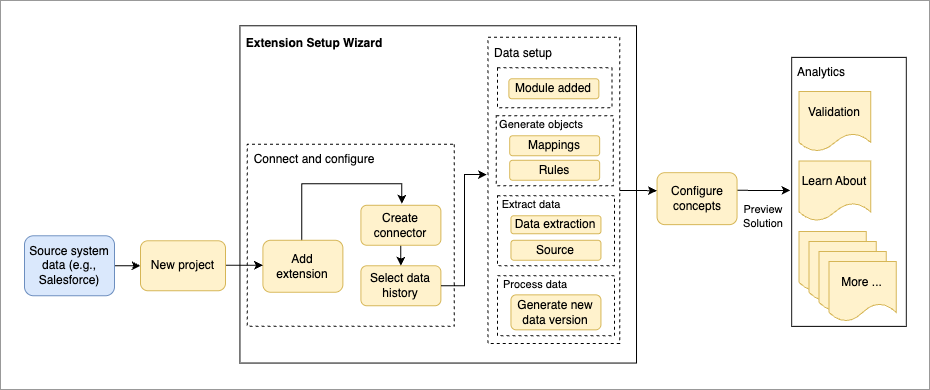
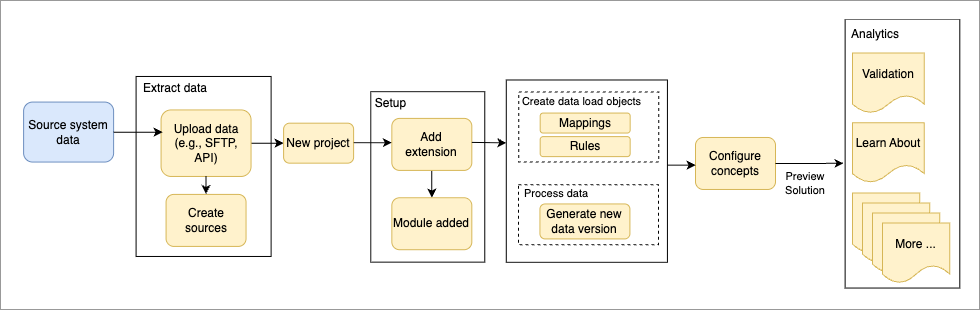
The following set up guide provides detailed information on the steps to successfully load data from your source system into Visier for the available Visier Extensions. After loading data, you'll configure concepts to connect your data values to Visier's analytic model. Depending on the Visier Extension you want to set up, you will use either the connector-based setup or source-based setup. For more information, see Set Up Visier Extensions.
If you use connector-based setup, you will load your data into Visier through a designated data connector. The following illustration summarizes the data load workflow for Visier Extensions using the connector-based setup.
If you use source-based setup, you will load your data into Visier using one of the data-in solutions, for example file upload. The following illustration summarizes the data load workflow for Visier Extensions using source-based setup.
Design considerations
To help you extend your Visier solution beyond the available Visier Extensions, we have created the following guides that walk you through the design decisions that were considered by Visier experts when building the extensions.
While the examples are focused on the Salesforce and ServiceNow® extensions, the design principles and guidelines can be applied when building any extension to the analytic model. If you have additional use cases beyond the out-of-the-box content in Visier, examine the design decisions that you can apply to extend the analytic model with new objects.