

Non-Versioned Security
Assign permissions, data access sets,
Overview
Administrators use versioned and non-versioned workflows to administer Visier tenants. Versioned workflows happen in projects where you define and edit the solution separately from the current production version. For more information, see Use Projects for Version Control. Non-versioned workflows happen in the global workspace and through Visier APIs where you define and edit the solution immediately without updating the production version.
You have a choice between versioned or non-versioned security in Visier. Versioned security is created and assigned to users within projects and results in a new production version of your solution. Non-versioned security is created and assigned to users using Visier APIs and does not change the production version.
When to use non-versioned security
Because non-versioned security is independent from data versioning, it prevents frequent version changes. This makes it easier to roll back or pinpoint a version that is causing issues in your tenant. You may consider using non-versioned security for frequent, small-scale security updates and when dealing with rapidly changing organizational structures.
Non-versioned security is effective immediately. Users do not need to log out or refresh the browser to update their non-versioned security access.
Use Visier APIs to assign security
You can choose whether the permissions, data access sets,
- Versioned: Associated with a new production version that releases any security changes to production. Created in a project or by using the Permissions API and User Groups V2 API with the
NonVersionedheader omitted or set tofalse. For more information about theNonVersionedheader, see API Headers. - Non-versioned: Take effect immediately and do not result in a new production version. Created by using the Permissions API or User Groups V2 API with the
NonVersionedheader set totrue.
Versioned and non-versioned methods cannot be mixed.
- If you want to modify an existing versioned permission, data access set,
NonVersionedheader omitted or set tofalse. - If you want to modify an existing non-versioned permission, data access set,
NonVersionedheader set totrue.
Similarly, versioned and non-versioned artifacts cannot be mixed. For example:
- Assign versioned data access sets to versioned permissions.
- Assign non-versioned permissions to non-versioned user groups.
Note: The Super Admin permission is a versioned permission that cannot sync to the non-versioned space. Public APIs for non-versioned security don't support special purpose permissions. Similarly, users cannot create new Super Admin permissions in Studio. To assign the Super Admin permission, use versioned methods such as direct assignment or user group assignment in a project. A user's effective permissions are the union of their versioned and non-versioned permissions. For more information about syncing permissions, see Synchronize security artifacts.
For more information, see Permissions API and User Groups V2.
View non-versioned security
You can see a list of all non-versioned permissions, data access sets,
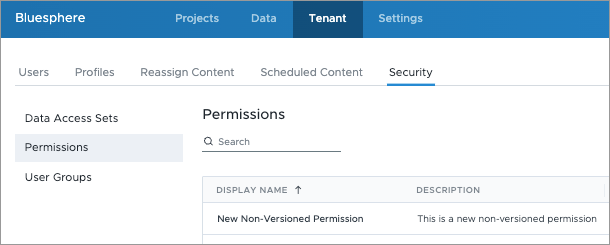
If the list is blank, your tenant doesn't have any non-versioned security artifacts. The following screenshot shows a tenant with one non-versioned permission.
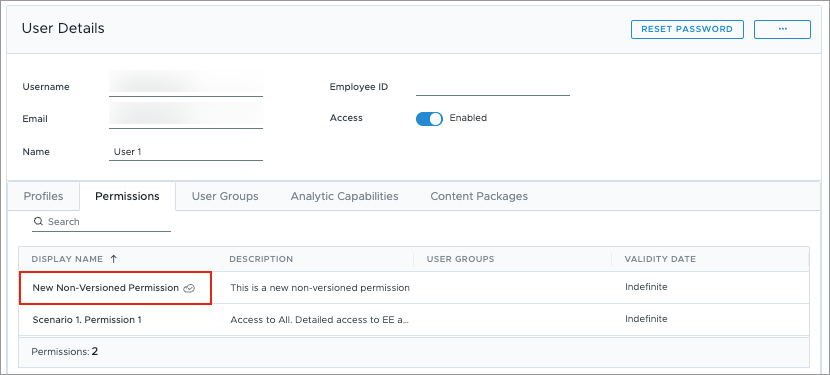
You can identify non-versioned permissions in a user or user group by the icon, as shown in the following screenshot.
Synchronize security artifacts
Copy versioned permissions, data access sets,
Access requirements
Users with the following:
- Profile capabilities: Security (Write, API)
Reach out to your administrator for access.
The system uses the artifact's unique identifier to match and copy versioned artifacts to the non-versioned environment. If you modify a versioned artifact after syncing, you must re-synchronize to apply your updates to its non-versioned counterpart.
When syncing, permissions
- Permissions and data access sets only: Recommended if you edit permissions in Visier but manage assignments through an external system, for example a SCIM-compliant identity provider (IdP).
- All artifacts: Best for one-time migrations of your entire versioned security structure and assignments.
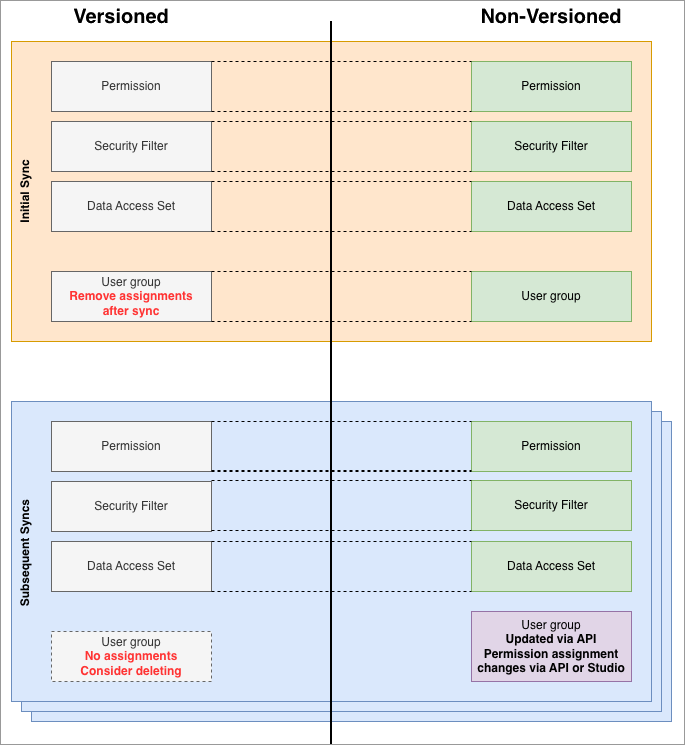
When transitioning from versioned security to non-versioned security, the initial sync must include:
- Access definitions. For example, permissions and data access sets.
- Permission assignment definitions. For example, direct assignments and user group assignments.
This ensures the sync captures the complete state of versioned security. Subsequent syncs should include only access definitions. Do not include permission assignment definitions in subsequent syncs. If any assignments changed through non-versioned methods, syncing the versioned definitions will overwrite those changes. After the initial sync, manage user group permission assignments through non-versioned methods. The default behavior is to only sync access definitions.
Synchronize in Studio
- On the global navigation bar, click Tenant, and then click the Security tab.
-
In the upper-right corner, click Synchronize.
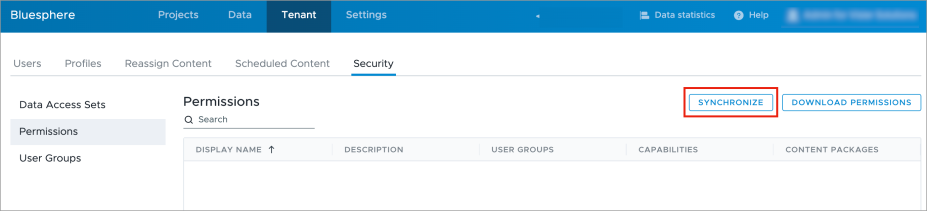
- Optional: Select additional security artifacts from the list, such as user groups and user assignments. Permission and data access sets are mandatory and preselected.
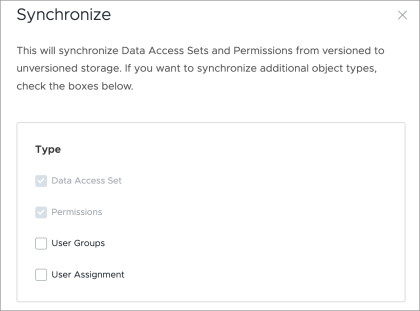
- Optional: Select Exclude suffix to exclude the <<NonVersioned>> suffix from synchronized artifact display names. This also removes the suffix from existing synchronized artifacts even if the versioned names haven't changed.
- Click Synchronize. Refresh your browser to view the synchronized security artifacts in the list.
Lock non-versioned security artifacts
You can optionally specify if non-versioned API calls should be subject to locking by setting the Prefer API header. Locking prevents incremental changes in multiple API calls from overwriting each other. You can lock non-versioned security artifacts in the following API endpoints:
- Patch multiple user groups: PATCH /v2/admin/user-groups
- Assign users to user groups: PUT /v1/admin/user-groups/users
- Remove users from user groups: DELETE /v1/admin/user-groups/users
- Update or insert (upsert) a user: PUT /v3/admin/users/{username}
The Prefer header works alongside a tenant feature flag. When enabled, the default is nvLock=global. When disabled, the default is not to lock API calls. Contact Visier Technical Support to enable the tenant feature flag. Valid values for the Prefer header:
- nvLock=global: Run API calls sequentially. Sequential API calls prevent calls from unintentionally overwriting each other.
- nvLock=artifact: Allow API calls in parallel. Parallel API calls only work if the calls do not conflict with each other. If a change wasn't applied, the request fails and returns the HTTP 409 conflict error. Run the request again until successful.
- nvLock=none: Disable the global lock if the tenant feature flag is enabled.
For more information, see the Prefer header in API Reference.