
Application Logs
The Application Logs tracks information about your users and how they are using the solution.
Overview
Performing regular audits will help you identify potential security issues, ensure your users are performing authorized activities, and keep your data safe. Download the Application Logs to monitor user activity, such as sign in events, import and export, Studio configurations, user management, changes to profiles and permissions, and analysis actions. Users can access Application Logs for 180 days prior to their generation date.
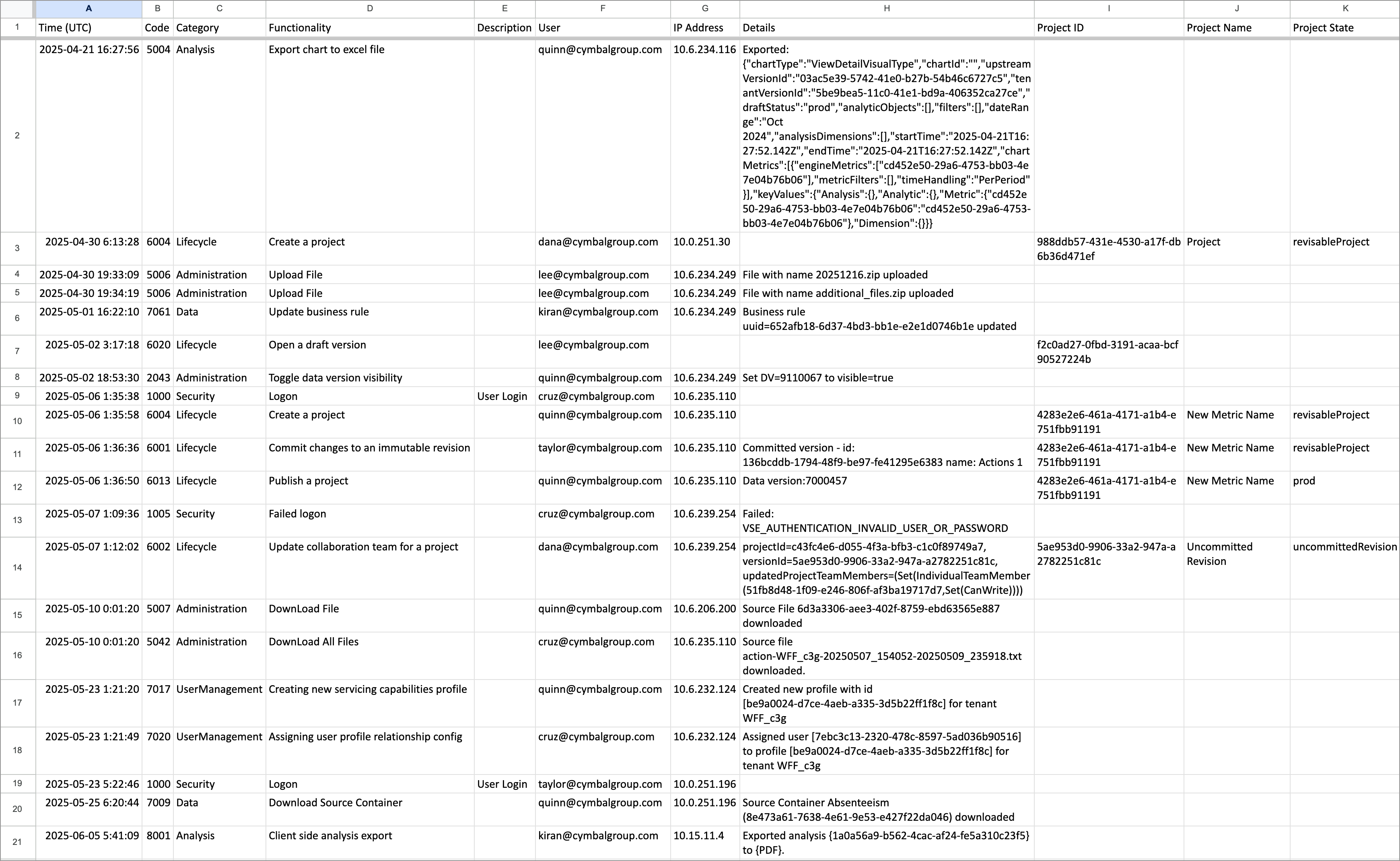
The log is generated as a .xlsx file and contains the following information:
|
Column |
Description |
|---|---|
|
Time (UTC) |
The time the event occurred. |
|
Category |
The type of event that was logged. |
|
Functionality |
The action that the user performed. |
|
Description |
Whether or not the event was a user logon. |
|
User |
The user who performed the action. Note: Visier logs the actions you take while previewing or impersonating another user. The Application Log creates two nearly identical rows: one for you and one for the target user. |
|
IP Address |
The IP address that the user logged on from. |
|
Details |
Additional information related to the action that was performed. For example, which user was deleted. |
|
Project ID |
The unique identifier of the project that the user performed an action in. |
|
Project Name |
The display name of the project that the user performed an action in. |
|
Project State |
The status of the project. |
The following screenshot shows an example of the Application Logs.
Download the Application Logs
Note: This feature is also available through Visier's public APIs. For more information, see Users API and Webhooks API.
- Do one of the following:
Option
Do this
In the global workspace
On the global navigation bar, click Tenant, and then click the Users tab.
In a project
On the navigation bar, click Security > Users.
- Click the More button
 > Download Application Logs in the upper-right corner of the Users room.
 - In the Download Application Logs dialog, select the date range for the log.
- Click Download.
Result: The log is generated as an XSLX file and automatically begins downloading.
Interpret the Application Logs
Exported analyses and visualizations
If a user downloads an analysis or visualization, the Application Log records information about the download.
The Application Log provides information about the format that an analysis or visual was downloaded to, such as PowerPoint or PDF. It will also include unique IDs for the analysis or visual, if available.
Depending on where a visual or analysis was downloaded, the Application Log provides different information, as explained below.
- If a visual is downloaded from Explore, the Application Log records that a visual was downloaded and the format it was downloaded to.
- If a visual is downloaded from within an analysis, the Application Log records the unique ID of the visual, the unique ID of the analysis, and the format it was downloaded to.
- If an analysis is downloaded, the Application Log records the unique ID of the analysis and the format it was downloaded to.
Unique IDs
The Application Log may provide a UUID or unique ID associated with a logged event, such as to indicate a specific analysis that was downloaded by a user. If you need more information about the event, file a support ticket with Visier Technical Support and provide the UUID or unique ID. Our team may be able to retrieve additional information about the event, such as an analysis display name or visualization title.
Audit Codes
The following table describes the available audit codes in the Application Log.
|
Code |
Category |
Functionality |
|---|---|---|
| 1000 | Security | Signed in |
| 1005 | Security | Failed sign in |
| 1006 | Security | Signed out |
| 1008 | Security | Changed password |
| 1009 | Security | Reset Password URL requested |
| 1010 | UserManagement | Created user |
| 1013 | UserManagement | Updated user |
| 1014 | UserManagement | Updated users in bulk |
| 1015 | UserManagement | Deleted user |
| 1016 | UserManagement | Updated user status |
| 1019 | UserManagement | Modified user group |
| 1020 | UserManagement | Modified user membership |
| 1021 | Security | Enabled SSO |
| 1022 | UserManagement | Created user through auto provisioning |
| 1023 | UserManagement | Updated auto provisioning configuration |
| 1024 | UserManagement | Failed to create user through auto provisioning |
| 1029 | Security | Reassigned user content |
| 1031 | Security | Modified data permission set |
| 1032 | Security | Row restriction collection |
| 1033 | Configuration | Modified data filter |
| 1034 | Configuration | Data filter collection |
| 1035 | Security | Modified content package |
| 1037 | Security | Signed in through data connector |
| 1038 | Security | Failed sign in through data connector |
| 1039 | UserManagement | Configured role |
| 1040 | UserManagement | Assigned role to user |
| 1041 | Security | Configured data security |
| 1042 | Security | Configured role module |
| 1043 | Security | Configured capability |
| 1044 | Security | Configured data access |
| 1045 | Security | Configured member filter |
| 1046 | Security | Configured data connector |
| 1047 | UserManagement | Renamed user |
| 1049 | Security | Signed in using OTP verification code |
| 1050 | Security | Failed OTP sign in |
| 1051 | Security | Generated OTP verification code |
| 1052 | UserManagement | Updated user email address in SAML assertion |
| 1053 | Security | Failed SLO sign out |
| 1054 | Security | Signed out using SLO |
| 1056 | Security | Updated allowed email domains |
| 1060 | Security | Reset password for SFTP user |
| 1061 | Security | Verified user email address |
| 1062 | Security | Signed in with session based security |
| 1064 | Security | User impersonation failed |
| 1065 | Security | Same-tenant user impersonation failed |
| 1066 | Security | Welcome new User password setup URL created |
| 1067 | Security | User enrolled in MFA |
| 1068 | Security | Reset MFA associated with a user |
| 1069 | Security | Password change failed |
| 1070 | Security | Created content package |
| 1071 | Security | Copied content package |
| 1072 | Security | Deleted content package |
| 1073 | Security | Reverted content package to parent |
| 1074 | Security | Granted MFA reset allowance to a user |
| 1075 | Security | Sent MFA reset OTP to user email |
| 1076 | Security | MFA reset OTP verification failed |
| 1077 | Security | MFA reset flow aborted |
| 2000 | Administration | Uploaded file |
| 2006 | Administration | Set data version |
| 2020 | Administration | Created login notice |
| 2021 | Administration | Updated login notice |
| 2022 | Administration | Deleted login notice |
| 2023 | Administration | Acknowledged login notice |
| 2024 | Administration | Published login notice |
| 2025 | Configuration | Updated company logo |
| 2026 | Configuration | Enabled or disabled tenant feature flag |
| 2027 | Configuration | Enabled or disabled delegate publishing |
| 2028 | Configuration | Set Aggregate threshold |
| 2029 | Configuration | Configured data version load type |
| 2030 | Administration | Updated inclusion status of each data source |
| 2031 | Configuration | Updated tenant information |
| 2032 | Administration | Rolled back data versions |
| 2033 | Security | Updated embeddable origins |
| 2034 | Configuration | Created tenant |
| 2035 | Configuration | Deprovisioned tenant |
| 2036 | Configuration | Created consolidated tenant |
| 2037 | Configuration | Updated consolidated tenant |
| 2038 | Configuration | Deleted consolidated tenant |
| 2039 | Administration | Created OAuth 2.0 client registration |
| 2040 | Administration | Updated OAuth 2.0 client registration |
| 2041 | Administration | Deleted OAuth 2.0 client registration |
| 2042 | Configuration | Updated automap settings |
| 2043 | Administration | Toggle data version visibility |
| 2044 | Configuration | Updated third party integrations settings |
| 2045 | Configuration | Enabled tenant access |
| 2046 | Configuration | Disabled tenant access |
| 2047 | Administration | Exported Vee query report as an XLS |
| 2048 | Administration | Updated isExcludedFromConsumptionPricing flag on analytic object |
| 2049 | Administration | Set issue state for data version issues |
| 2050 | Administration | Updated tenant feature toggles |
| 2051 | Security | Updated allowed OAuth IDP URL domains |
| 2052 | Configuration | Updated AI features settings |
| 2053 | Configuration | Updated ProcessAfterReceiving configuration |
| 2054 | Administration | Updated release version configuration |
| 2055 | Administration | Registered third party integration client ID |
| 2056 | Administration | Deleted third party integration client ID |
| 2057 | Configuration | Updated user feature preview settings |
| 3000 | UserManagement | Created data connector link |
| 3001 | UserManagement | Deleted data connector link |
| 3002 | UserManagement | Deactivated data connector feature |
| 3003 | UserManagement | Activated data connector feature |
| 3004 | UserManagement | Requested data connector link |
| 4022 | Planning | Updated plan item |
| 5004 | Analysis | Exported chart to Excel file |
| 5006 | Administration | Uploaded file |
| 5007 | Administration | Downloaded source file |
| 5018 | Administration | Requested content reassignment |
| 5019 | Administration | Reassigned analysis |
| 5020 | Administration | Reassigned captured chart |
| 5021 | Administration | Reassigned plan |
| 5022 | Administration | Reassigned key group |
| 5023 | Administration | Reassigned single dimension group |
| 5024 | Administration | Reassigned project |
| 5025 | Administration | Reassigned scenario |
| 5026 | Analysis | Exported detailed data connector |
| 5027 | Analysis | Exported aggregated data connector |
| 5028 | Administration | Reassigned property set |
| 5029 | Analysis | Duplicated analysis |
| 5030 | Analysis | Copied analysis |
| 5031 | Analysis | Created email campaign |
| 5032 | Analysis | Deleted email campaign |
| 5033 | Analysis | Updated email campaign |
| 5034 | Analysis | Deleted email campaign by analysis |
| 5035 | Analysis | Reassigned email campaign(s) |
| 5036 | Administration | Reassigned assumption |
| 5037 | Administration | Reassigned data connector |
| 5038 | Administration | Imported data version |
| 5039 | Analysis | Uploaded analysis image |
| 5040 | Administration | Uploaded employee photos |
| 5041 | Administration | Refreshed employee photos |
| 5042 | Administration | Downloaded all files |
| 5043 | Analysis | Created analysis debug report |
| 5044 | Analysis | Shared an artifact |
| 5045 | Analysis | Deleted an artifact |
| 5046 | Administration | Uploaded Guidebook image |
| 5047 | Administration | Uploaded white labeling image |
| 5048 | Data | Generated per-tenant PGP key pair |
| 5049 | Data | Deleted per-tenant PGP key pair |
| 5050 | Analysis | Unsubscribed from email campaign |
| 5051 | Analysis | Resubscribed to email campaign |
| 5052 | Security | Generated per-tenant encryption key |
| 5053 | Security | Deleted per-tenant encryption key |
| 5054 | Analysis | Created alert |
| 5055 | Analysis | Updated alert |
| 5056 | Analysis | Deleted alert |
| 5057 | Analysis | Updated email digest schedule |
| 5058 | Analysis | Updated alert recipient status |
| 5059 | Analysis | Exported client side chart |
| 5060 | Analysis | Exported client side analysis |
| 5061 | Analysis | Exported client side chart within an analysis |
| 5062 | Administration | Alert Reassignment |
| 5063 | Analysis | Created system event alert |
| 5064 | Analysis | Updated system event alert |
| 5065 | Analysis | Deleted system event alert |
| 6001 | Lifecycle | Committed changes to an immutable revision |
| 6002 | Lifecycle | Updated collaboration team for a project |
| 6003 | Lifecycle | Updated revision to latest |
| 6004 | Lifecycle | Created a project |
| 6005 | Lifecycle | Rolled back to a previous revision |
| 6007 | Lifecycle | Merged a revision to a project |
| 6008 | Lifecycle | Copied a project |
| 6009 | Lifecycle | Submitted a project for approval |
| 6010 | Lifecycle | Rejected a project |
| 6011 | Lifecycle | Archived a project |
| 6012 | Lifecycle | Reopened a project |
| 6013 | Lifecycle | Published a project |
| 6014 | Lifecycle | Deleted a project |
| 6015 | Lifecycle | Updated a project |
| 6018 | Lifecycle | Opened a shared project by a non-creator |
| 6019 | Lifecycle | Merged update conflicts |
| 6020 | Lifecycle | Opened a draft version |
| 6023 | Lifecycle | Archived a prototype project |
| 6024 | Lifecycle | Deleted a prototype project |
| 6025 | Lifecycle | Created a prototype project |
| 6026 | Lifecycle | Rebased project to latest as reviewer and auto-committed |
| 6027 | Lifecycle | Committed a prototype project revision |
| 6028 | Lifecycle | Updated a prototype project |
| 6029 | Lifecycle | Updated prototype revision to latest |
| 7000 | UserManagement | Assigned a system profile |
| 7001 | UserManagement | Unassigned a system profile |
| 7002 | UserManagement | Created a system profile |
| 7003 | UserManagement | Updated a system profile |
| 7004 | UserManagement | Deleted a system profile |
| 7005 | Data | Pushed data through Data Intake API |
| 7006 | Data | Created source container |
| 7007 | Data | Deleted source container |
| 7008 | Data | Updated source container |
| 7009 | Data | Downloaded source container |
| 7010 | Data | Updated metadata for upload |
| 7011 | Data | Deleted source file |
| 7012 | Data | Assigned source files to a source |
| 7013 | Data | Reassigned source file to a source |
| 7014 | Data | Exported unversioned source artifacts as JSON |
| 7015 | Data | Imported unversioned source artifacts from JSON |
| 7016 | Data | Excluded all sources |
| 7017 | UserManagement | Created servicing capabilities profile |
| 7018 | UserManagement | Updated servicing capabilities profile |
| 7019 | UserManagement | Deleted servicing capabilities profile |
| 7020 | UserManagement | Assigned user profile relationship configuration |
| 7021 | UserManagement | Unassigned user profile relationship configuration |
| 7023 | UserManagement | Updated sudo user profile |
| 7024 | UserManagement | Converted servicing capabilities to Vantage capabilities |
| 7025 | UserManagement | Exported users with profile assignments |
| 7026 | UserManagement | Exported capabilities profile |
| 7027 | Data | Disk cache dumped |
| 7028 | Data | List of source files used in data version dumped |
| 7029 | Data | Deleted source files |
| 7030 | Data | Downloaded queried record results |
| 7031 | Data | Exported disk cache |
| 7032 | Administration | Exported translations |
| 7033 | Administration | Imported translations |
| 7034 | Data | Disk cache dumped for data object |
| 7035 | Data | Uploaded files via Direct Intake API |
| 7036 | Data | Downloaded source query results |
| 7038 | Data | Exported flag and fix items |
| 7039 | Data | Imported flag and fix items |
| 7040 | Data | Created connector for data extraction |
| 7041 | Data | Deleted connector for data extraction |
| 7042 | UserManagement | Exported user content security report |
| 7043 | Data | Imported hypothesis items |
| 7044 | Data | Exported hypothesis items |
| 7045 | Lifecycle | Exported custom content |
| 7046 | Data | Exported hypothesis template |
| 7047 | Data | Exported hypothesis compensation review template |
| 7048 | ObjectManagement | Exported changes from applying granular merge |
| 7050 | UserManagement | Exported user security impact report |
| 7051 | UserManagement | Edited profile assignments of a user group |
| 7052 | UserManagement | Assigned profile to user during auto provisioning |
| 7053 | Administration | Put Direct Data Intake configuration |
| 7054 | Data | Created Direct Data Intake transaction |
| 7055 | Data | Uploaded data to a Direct Data Intake transaction |
| 7056 | Data | Committed Direct Data Intake transaction |
| 7057 | Data | Rolled back Direct Data Intake transaction |
| 7058 | Data | Uploaded data through Data Intake API |
| 7059 | Data | Bypassed full data access validation |
| 7060 | Data | Created business rule |
| 7061 | Data | Updated business rule |
| 7062 | Data | Copied business rule |
| 7063 | Data | Created multi-subject rule |
| 7064 | Data | Created event stream sample |
| 7065 | Data | Imported events for ID |
| 7066 | Data | Created and imported correction events for ID |
| 7067 | Data | Previewed business rule |
| 7068 | Data | Updated system rule |
| 7069 | Data | Created credential for data extraction |
| 7070 | Data | Deleted credential for data extraction |
| 7071 | Data | Updated credential for data extraction |
| 7072 | Administration | Changed sidecar solution configuration |
| 7073 | Administration | Deleted sidecar solution configuration |
| 7074 | Data | Created Direct Data Intake job design |
| 7075 | Data | Created or updated Direct Data Intake mapping |
| 7076 | Data | Created or updated Direct Data Intake data source |
| 7077 | Data | Created or updated Direct Data Intake tenant design |
| 7078 | Data | Created or updated a data version snapshot |
| 7079 | Data | Deleted a data version snapshot |
| 7080 | Data | Previewed a data version snapshot |
| 7081 | Data | Downloaded source files |
| 7082 | Configuration | Self-serve extension module |
| 7083 | Data | Cloned files into existing source |
| 7084 | Data | Created versioned alert |
| 7085 | Data | Updated versioned alert |
| 7086 | Data | Deleted versioned alert |
| 7087 | Data | Exported data version data |
| 7088 | Data | Loaded sample data to Direct Data Intake transaction |
| 7089 | Misc | Downloaded application definition |
| 7090 | Data | Created table source |
| 7091 | Data | Updated table source |
| 7092 | Data | Deleted table source |
| 7093 | Data | Begin table source transaction |
| 7094 | Data | Executed table source SQL job |
| 7095 | Data | Uploaded table source SQL input file |
| 7096 | Data | Downloaded table source SQL output file |
| 7097 | Data | Downloaded the source container in a prototype |
| 7098 | Data | Created source container in a prototype |
| 7099 | Data | Deleted source container in a prototype |
| 7100 | Data | Deleted source files in a prototype |
| 7101 | Data | Updated source container in a prototype |
| 7102 | Data | Assigned source files to a source in a prototype |
| 7103 | Data | Uploaded source file in a prototype |
| 7104 | Data | Applied data changes in a prototype |
| 7105 | ObjectManagement | Created prototype analytic object |
| 7106 | ObjectManagement | Deleted prototype analytic object |
| 7107 | Data | Created data out credential |
| 7108 | Data | Updated data out credential |
| 7109 | Data | Deleted data out credential |
| 7110 | Data | Created data out configuration |
| 7111 | Data | Updated data out configuration |
| 7112 | Data | Deleted data out configuration |
| 7113 | Data | Validated data out credential connection |
| 7114 | Data | Created data out connector schedule |
| 7115 | Data | Updated data out connector schedule |
| 7116 | Data | Deleted data out connector schedule |
| 7117 | Data | Paused data out connector schedule |
| 7118 | Data | Resumed data out connector schedule |
| 7119 | Data | Dispatched data out connector job |
| 7120 | Configuration | Create Vee instruction |
| 7121 | Configuration | Update Vee instruction |
| 7122 | Configuration | Delete Vee instruction |
| 7123 | Configuration | Create Vee safeguard |
| 7124 | Configuration | Update Vee safeguard |
| 7125 | Configuration | Delete Vee safeguard |
| 7126 | Data | Regenerate table source materialized view |
| 7127 | Data | Created file configuration |
| 7128 | Data | Updated file configuration |
| 7129 | Data | Deleted file configuration |
| 8000 | Network | Modified SFTP keys |
| 8001 | Network | Modified IP whitelist |
| 8002 | Network | Data permission aggregate warning |
| 8005 | Security | Created new SSO configuration |
| 8006 | Security | Updated existing SSO configuration |
| 8007 | Security | Deleted existing SSO configuration |
| 8008 | Security | Created Signature Public Key |
| 8009 | Security | Updated Signature Public Key |
| 8010 | Security | Deleted Signature Public Key |
| 8011 | Security | Generated SSO test login link |
| 9002 | Misc | Accepted agreement |
| 9003 | Misc | Downloaded file |
| 9004 | Misc | Deleted file |
| 9005 | Misc | Uploaded secure file |
| 9007 | Misc | Copied and replaced secure file |
| 11000 | Gemini | Changed Smart Compensation configuration |
| 11001 | Gemini | Created Smart Compensation cycle |
| 11002 | Gemini | Changed Smart Compensation cycle status |
| 11003 | Gemini | Exported Smart Compensation cycle |
| 11004 | Gemini | Changed Smart Compensation task status |
| 11005 | Gemini | Smart Compensation support user changed target tenant |
| 11006 | Gemini | Changed Smart Compensation cycle/task due dates |
| 11007 | Gemini | Smart Compensation system admin user changed a cycle's owner |
| 13001 | Security | Created SCIM bearer token |
| 13002 | Security | Changed SCIM configuration |
| 13003 | Security | Deleted SCIM bearer token |
| 14000 | CompensationBenchmarks | Matched jobs |
| 14001 | CompensationBenchmarks | Unmatched jobs |
| 14002 | CompensationBenchmarks | Exported market data |
| 15000 | OrganizationDesign | Created Organizational Design plan |
| 15001 | OrganizationDesign | Deleted Organizational Design plan |
| 15002 | OrganizationDesign | Created Organizational Design plan scenario |
| 15003 | OrganizationDesign | Deleted Organizational Design plan scenario |
| 15004 | OrganizationDesign | Updated Organizational Design principles |
| 15005 | Misc | Exported grid data as CSV |
| 15006 | OrganizationDesign | Updated Organizational Design plan collaborators |
| 15007 | OrganizationDesign | Updated Organizational Design scenario access |
| 15008 | OrganizationDesign | Duplicated Organizational Design plan scenario |
| 15009 | OrganizationDesign | Updated Organization Design project baseline |