
Pilot Features
Enable early access and beta features to preview and test new functionality before release.
Access requirements
Custom profile with these capabilities: Pilot Features Management
Reach out to your administrator for access.
Overview
Pilot features give you early access to new functionality before General Availability. Try beta features and provide feedback to help shape the final experience or preview upcoming features to prepare your organization for change.
As an administrator, you can enable pilot features for yourself and then make them available tenant-wide. As with other features, access depends on each user's security profile and capabilities.
Note: This feature is also available through Visier's public APIs. For more information, see Pilot Features API.
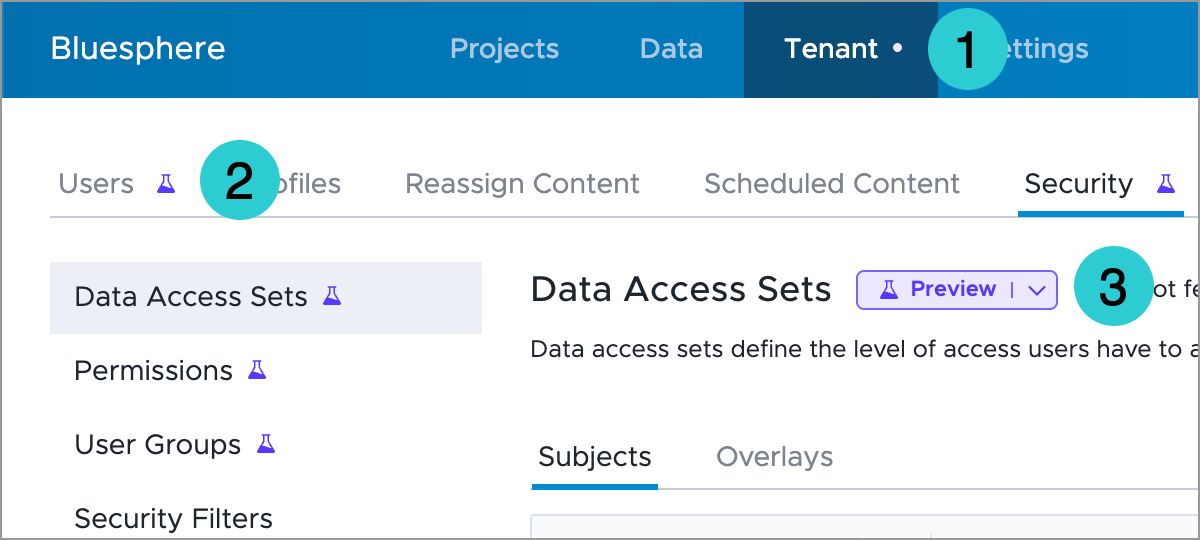
To help you identify and explore pilot features, we've added the following visual cues and in-context help:
- Dot indicators in the navigation bar mark pages with new or updated functionality.
- Preview and Beta icons identify new options, buttons, and menu items.
- Preview and Beta dropdowns let you share feedback or click Learn More to get an overview of the feature.
Enable a feature in the administrating tenant
-
On the global navigation bar, click Settings > Pilot Features.
-
Do the following:
- To give yourself access to the feature, turn on the My access toggle. Your access to the feature is managed at the administrating tenant level and applies across your analytic tenants.
- To make the feature available tenant-wide, turn on the Tenant-wide toggle.
- Click Save.
If a feature requires new or additional access requirements, update user profiles and permissions accordingly. Under each feature description, review the Visible to users with these required administrator capabilities list.
Enable a feature for analytic tenants
Pilot feature access for analytic tenants is managed at the administrating tenant level. Once a feature is available, you can override its default state for individual analytic tenants.
-
On the global navigation bar, click Settings > Pilot Features.
- Under Analytic tenant access, select the Allow analytic tenant access checkbox to make the feature available across your analytic tenants.
- Select the default state for your analytic tenants. When enabled, the feature is available to users in the tenant who meet the access requirements. To use a different setting for an individual tenant, open that analytic tenant and override the default at any time.