
Vee in Slack
Ask Vee questions about your workforce in Slack.
Vee gives you direct access to your organization's people data through a simple conversational interface. This way of interacting with Visier People is designed to help you quickly find answers to your business questions without having to build your own visualizations and conducting your own analysis.
Prerequisites
-
Vee's functionality varies based on your organization’s specific configuration. Before asking Vee a question, ensure you've identified which Vee experience you have. For more information, see Determine your Vee experience.
-
Your administrator must enable the integration before you can start a conversation with Vee in Slack. If you don't have access to Vee by Visier in Slack, contact your administrator. For instructions on how to enable the integration, see Set Up Vee in Slack.
Add Vee by Visier to Slack
Add the Vee by Visier app to your Slack workspace. You may need administrative approval to add the app if your administrator enabled app approval.

Ask Vee 2.0 a question
- To start a conversation in Slack, open the Vee by Visier app in your Slack workspace.
-
Type
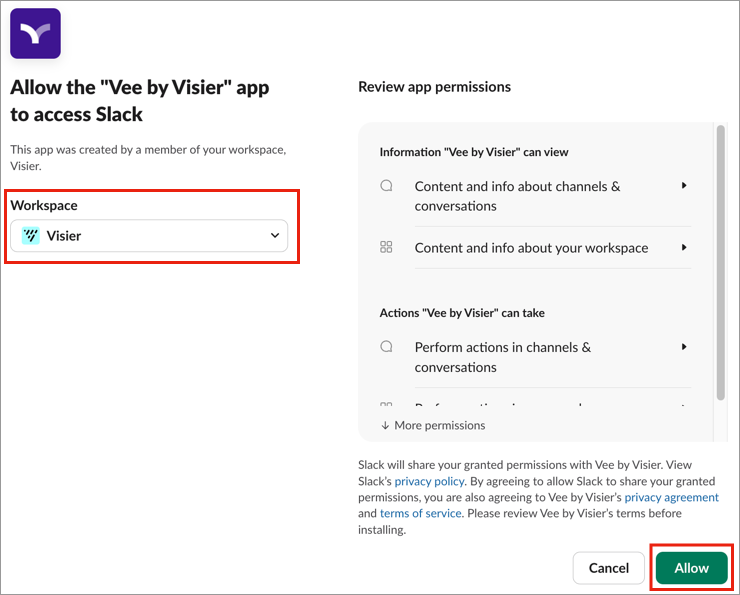
/vee-signinto bring up the Sign in message and click the Sign In button. The sign in link expires in 2 minutes. If you have not signed in to Slack before, you may be prompted to enter your Slack workspace.Result: The Allow the "Vee by Visier" app to access Slack page opens in a new browser tab.
-
Verify that you have selected the admin-approved Slack workspace from the dropdown, then click Allow.
-
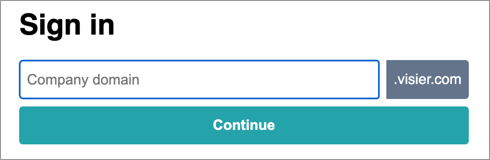
In the Sign in page, enter the vanity name in your Visier URL and click Continue. For example, if your Visier URL is jupiter.visier.com, your tenant vanity name is jupiter.
-
Sign in using your Visier username and password or single sign-on credentials.
Result: If successful, you will receive the You're signed in message. Close the tab and go back to Vee by Visier in Slack.
Note: The default session timeout is 60 days.
-
In the Vee by Visier chat, enter a question in plain language or type
/vee-helpto bring up the How to use Vee in Slack message which contains pre-built questions to start your conversation.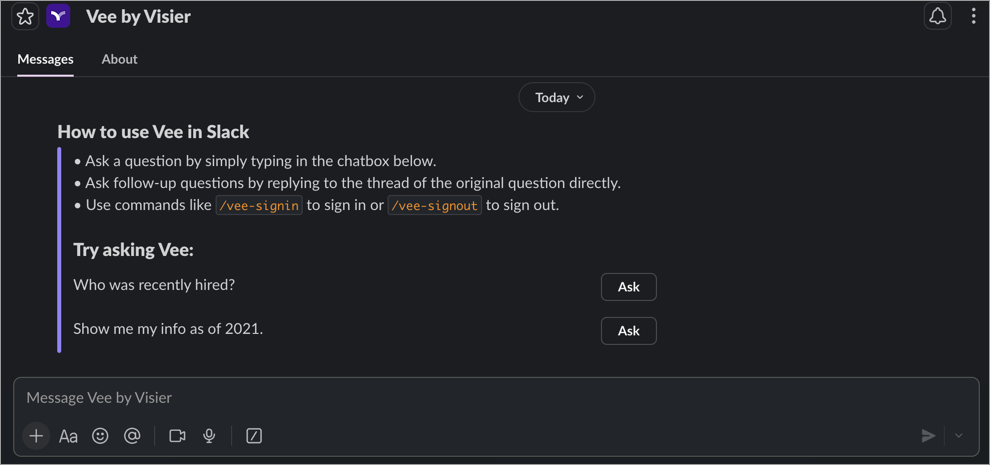
Note: Vee only works in direct messages. Sending messages in channels or group conversations will prompt you to send a direct message in the Vee by Visier chat instead.
-
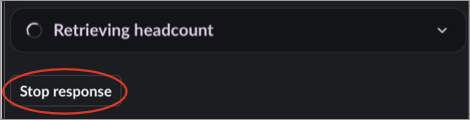
While Vee processes your question, progress messages display real-time updates. If you'd rather ask something else before Vee finishes, click the Stop response button and submit a new question.
-
If Vee needs clarification on an ambiguous term in your question, for example How many SWEs do we have? it will ask you to select the members you intended directly in the chat. This helps Vee understand exactly what you're looking for before it provides a response.
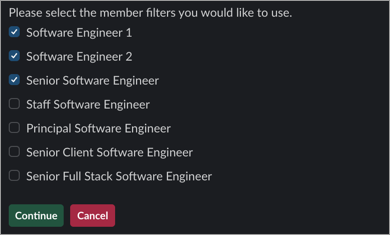
-
Review the answer and view the visualization that is generated. Each insight is supported by citations that reference the underlying data source. Citations are marked in responses with a number, and the full citation list appears at the end of the response. Click the citation link to see the visualization or definition in the Explore room of the solution experience.
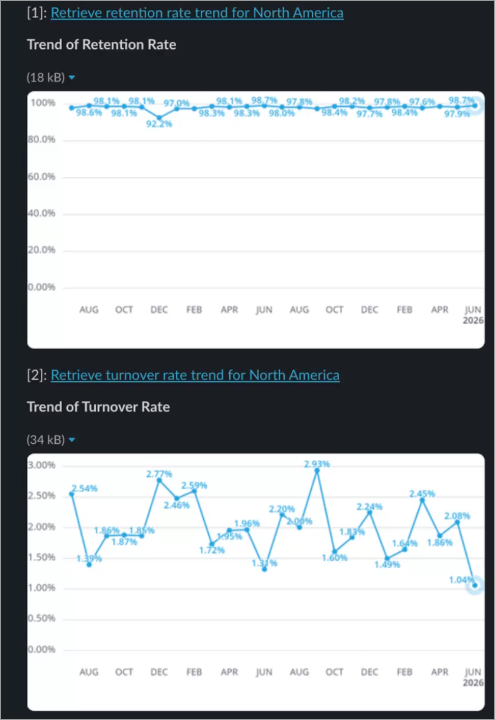
Note: Vee's responses may be inaccurate. Review and verify critical information.
-
After providing an answer, Vee will prompt you with follow-up actions directly in the chat. You can type the number of the option you want to continue the conversation with or move on to the next step.
- Ask follow-up questions in the question thread. Vee retains your current chat history, so you don't need to worry about retyping the whole question from scratch. You can ask multiple questions to delve deeper into a single inquiry.
- Drill down further by entering another question. For example: What about last month?
- If the response isn't quite what you are looking for, you can adjust the result by suggesting changes and edits. Vee will refine its response based on the additional information. For example: Group by Organization or I meant Jason K
- Provide feedback to the generated response by clicking the This was helpful button
 or This wasn't helpful button
  .
. - To start a new conversation, send a direct message in the chat instead of replying to an existing thread. Existing conversations remain active for 24 hours after the last reply, after that, you will be prompted to start a new conversation.
Note: Allow Vee to finish processing your question before sending another. If you send a second question while a previous question is being processed, you will be prompted to wait for the first question to complete.
- To sign out of your Visier People account, type
/vee-signout.
Ask Vee a question
- To start a conversation in Slack, open the Vee by Visier app in your Slack workspace.
-
Type
/vee-signinto bring up the Sign in message and click the Sign In button. The sign in link expires in 2 minutes. If you have not signed in to Slack before, you may be prompted to enter your Slack workspace.Result: The Allow the "Vee by Visier" app to access Slack page opens in a new browser tab.
-
Verify that you have selected the admin-approved Slack workspace from the dropdown, then click Allow.
-
In the Sign in page, enter the vanity name in your Visier URL and click Continue. For example, if your Visier URL is jupiter.visier.com, your tenant vanity name is jupiter.
-
Sign in using your Visier username and password or single sign-on credentials.
Result: If successful, you will receive the You're signed in message. Close the tab and go back to Vee by Visier in Slack.
Note: The default session timeout is 60 days.
-
In the Vee by Visier chat, enter a question in plain language or type
/vee-helpto bring up the How to use Vee in Slack message which contains pre-built questions to start your conversation.
Note: Vee only works in direct messages. Sending messages in channels or group conversations will prompt you to send a direct message in the Vee by Visier chat instead.
-
Review the answer and view the visualization that is generated. Click View in Visier to see the visualization in the Explore room of the solution experience.
Note: Vee's responses may be inaccurate. Review and verify critical information.
- Ask follow-up questions in the question thread. Vee retains your current chat history, so you don't need to worry about retyping the whole question from scratch. You can ask multiple questions to delve deeper into a single inquiry.
- Drill down further by entering another question. For example: What about last month?
- If the response isn't quite what you are looking for, you can adjust the result by suggesting changes and edits. Vee will refine its response based on the additional information. For example: Group by Organization or I meant Jason K
- Provide feedback to the generated response by clicking the This was helpful button or This wasn't helpful button .
- To start a new conversation, send a direct message in the chat instead of replying to an existing thread. Existing conversations remain active for 24 hours after the last reply, after that, you will be prompted to start a new conversation.
Note: Allow Vee to finish processing your question before sending another. If you send a second question while a previous question is being processed, you will be prompted to wait for the first question to complete.
- To sign out of your Visier People account, type
/vee-signout.
For some ideas on how to make the most out of your conversations, see Vee Sample Questions.
Troubleshooting
The following table describes the most common messages you'll see if a message attempt was unsuccessful and provides guidance on how to troubleshoot each case.
|
Message |
Cause |
Solution |
|---|---|---|
|
Your installation with this app is no longer available |
If you encounter this message when trying to send a message to Vee, it indicates that the integration has been disconnected. |
Your administrator must reinstall the Vee by Visier app into your workspace. For more information, see Set Up Vee in Slack. |
|
<command> failed with the error "operation_timeout" |
If you encounter this message after submitting a command to Vee, it indicates that the initial connection window may have timed out, but it does not necessarily mean that the request failed. |
In most cases, Vee is still processing the request and will return the response shortly after the message appears. If no response is returned after a short while, contact your administrator. |