
Vee Boards
AI-augmented analyses that make insights accessible, understandable, and actionable for all users.
Overview
People leaders often miss key insights because they don't have the time or expertise to interpret complex data. By transforming the data in an analysis into a personalized, plain language narrative, Vee Boards empower managers to make better, faster decisions.
With AI explanations, these analyses extend beyond traditional dashboards, providing support similar to having a dedicated analyst. They can:
- Summarize key insights from data
- Identify areas of concern
- Explain factors that have contributed to the current state
- Draw attention to trends, patterns, and outliers
- Make intelligent suggestions on where to focus for maximum KPI impact
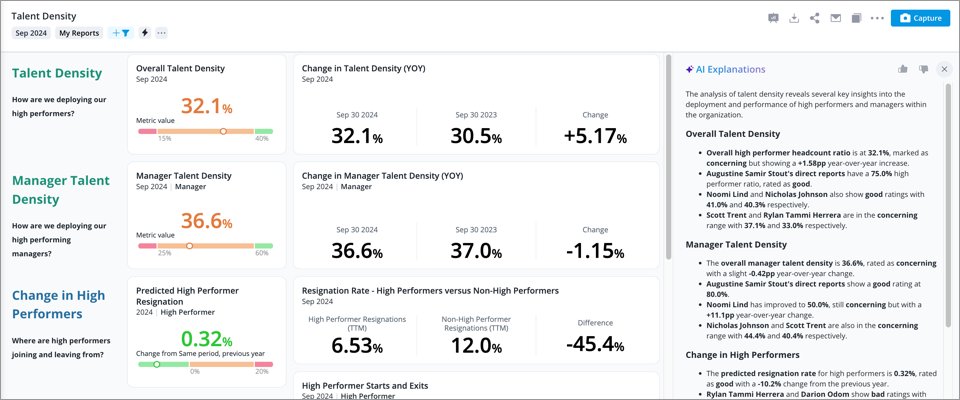
Vee examines the data behind the charts and analyzes the data at a deeper level to identify relevant insights for the target audience such as key metric values, outliers, significant trends, notable populations, and areas of concern based on traffic lighting settings. The data is then processed by a large language model (LLM) to produce clear, easy-to-understand AI Explanations.
Ready to scale your insights? Easily turn any existing analysis into a Vee Board to drive instant, informed action across your organization. For more information, see Create a Vee Board.
Note: Vee 2.0 can explain any analysis without requiring AI Explanations to be enabled. If you have Vee 2.0, see Optimize an Analysis for Vee to select the source content.
Generate an AI explanation
Access requirements
Permission with these capabilities: Vee Boards
Reach out to your administrator for access.
Prerequisites: Your organization must opt in to AI features. In the global workspace, click Settings > AI Features.
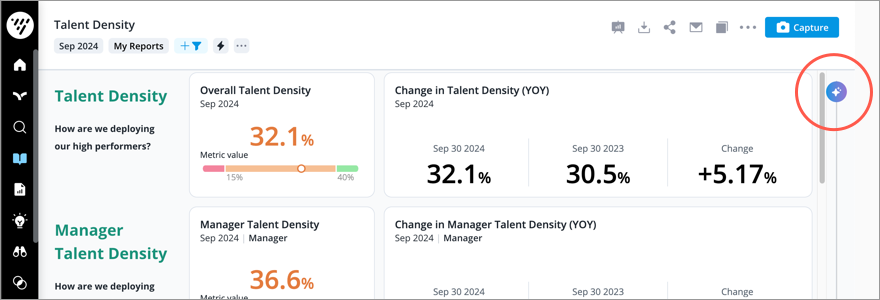
To analyze the data in a Vee Board and get a summary of the insights, click the AI Explanations button  .
.
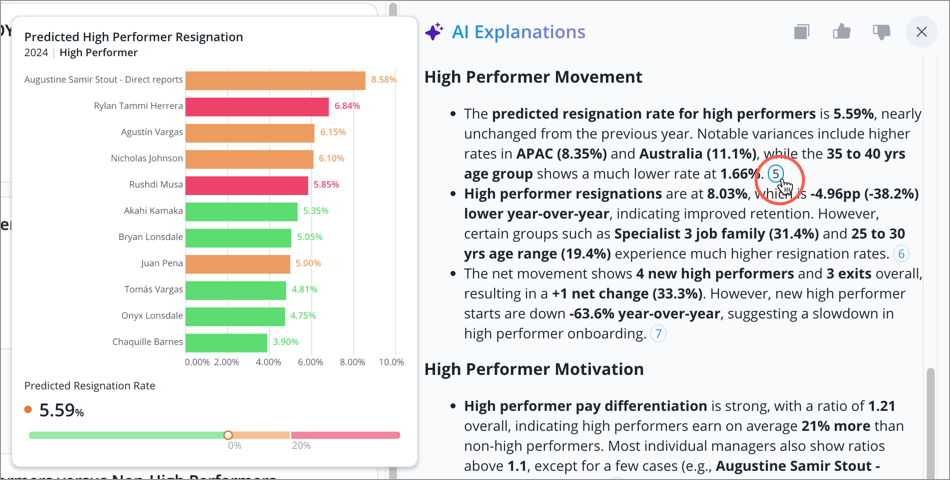
Each insight is supported by citations that reference the underlying data source. Hover over a citation to preview the corresponding visual, and click the citation to open the visual in full screen.
Frequently asked questions
What data gets passed from to the large language model (LLM)
Just like any analysis, users can only see the data that they are allowed to see in Vee Boards. Data security also extends to the AI explanations, as Vee only processes data within the analysis. To generate the AI explanations, Vee passes the data within the Vee Board and a prompt to the LLM. This differs from asking Vee a question, where only the question goes to the LLM. For more information, see Vee Architecture, Privacy, and Security.
Is my data safe?
Yes. Visier prioritizes data privacy by ensuring that the LLM only receives the necessary information to generate a natural language response. Additionally, our LLM partners are SOC 2 certified for their GPT and LLM services and have committed to not persisting or using the data sent by Vee for training purposes. For more information about how Visier is currently employing AI technologies, see Artificial Intelligence at Visier: FAQs.
Why does my AI explanation change each time I generate one?
AI is non-deterministic, meaning the same input may result in slightly different explanations each time you generate one.
Are there prebuilt Vee Boards?
Visier experts have developed a series of Vee Boards specifically designed to address the top concerns of specific executives and executive groups. You can find the prebuilt Vee Boards in the Executive Boards Guidebook.
Depending on your application subscription, some available Vee Boards include:
- Talent Density: Designed to help the CHRO and CEO ensure that the organization is building and maintaining a high performance workforce.
- People Cost: Shows the CHRO and CFO the precise ways workforce costs are currently affecting the organization’s ability to hit its financial targets.
- Manager Bench Strength: Built for the CHRO, CEO, and COO trying to drive change. It provides an assessment of the strength, depth, and future resilience of the management group that is driving results within the business.
You must load the required data and complete configuration for the prebuilt Vee Boards. For more information, see: