
Data Processing
Learn how Visier processes source data through an event stream loader using a domain-specific language.
Overview
The data processing system is a pipeline that extracts and transforms data using proprietary domain-specific languages (DSLs). Unlike traditional extract, transform, and load (ETL) tools, Visier's event stream model represents all information as a series of events. Events can target profile-like attributes, such as an employee's job title, or instantaneous events, such as an employee's hire event. The event stream model and the separation of source and target schema supports time-based analysis and can process a wide range of data shapes.
This article defines data processing concepts, the stages through which Visier processes your source data, and the DSLs that extract and transform the data within those stages.
Before sending data to Visier, you must:
- Choose the data transfer method. For more information, see Bring Data In. If sending data through file upload, make sure the files meet Visier's specifications. For more information, see Data File Guidelines.
- Set up sources to receive the data. For more information, see Sources.
- Set up analytic objects and attributes to represent the data, such as Employee or Applicant. Visier provides many out-of-the-box objects to represent data, so take the time to evaluate whether the provided objects meet your requirements. If there are additional requirements, you can create new objects in a project. For more information, see Analytic Objects.
To kick off data processing:
- Send the data to Visier using your selected method.
- Run a job in Visier. Jobs can be run ad-hoc or on a scheduled cadence. For more information, see Jobs.
After Visier processes your data, you can:
- Set up the mappings that link data to the objects that represent data, such as Employee and Applicant. For more information, see Mappings.
- Validate the data. For more information, see Validate Data.
Core concepts
To understand data processing, you must first be familiar with the analytic objects that form Visier's analytic model and the intermediate data representations used in the pipeline.
Analytic objects
Visier's analytic model is based on the following temporal objects:
- A subject is an entity that changes over time, for example, employees, applicants, requisitions, learning items, and sales opportunities. For more information, see Subjects.
- An event is something that happens at a specific moment in time and may be associated with one or more individuals. For more information, see Events.
- An overlay contains already-aggregated values and are used for benchmarking data and measuring KPIs, among other uses. Because overlays contain aggregated data, there is no information about individual data points. For more information, see Overlays.
Intermediate data representations
The event stream loader converts raw source data into:
- Event stream: A collection of chronologically-ordered events for each subject member, for example, changes for one employee. The event stream loader converts the event stream into the profile. Each event in the event stream:
- Is associated with a subject member and date and, if applicable, a value that describes the change.
- Represent profile change events (changes to a subject, often inferred by the event stream loader) or regular events (events that capture changes to attributes for a subject member).
- Profile: A state-based snapshot of a subject over a period. The profile stores the final and complete state of a subject member at an instant in time, including the validity interval for attribute values.
Time handling
Every analytic object in Visier has an intrinsic notion of time. A subject evolves over time, events happen at a specific time, and overlay values are valid for some interval.
This temporal model allows for more than just present and historical queries; it is essential for:
- Powering Visier's security model.
- Defining metrics that look at analytic objects at particular stages of their lifecycle.
- Ensuring consistent and accurate calculations when filtered or grouped by changing structures, for example, an evolving organizational structure.
For more information, see Time in Metrics.
Platform
Visier consists of:
- An in-memory multidimensional database for fast queries.
- A proprietary ETL pipeline (the event stream loader) for handling large volumes of data at high speed.
- An integrated development environment (IDE) to support modeling and configurations.
- An interactive analytic solution for answering business questions.
Studio, Visier's IDE, allows for descriptive models to be created at a meaningful level to a business user, abstracting away underlying complexity. Studio users can author metrics in the Visier Formula Language (VFL), and the resulting models and content can be packaged into new analytic solutions. For more information about designing in Studio, see Administration.
The interactive analytic solution provides rich, multidimensional analysis using the analytic model and metrics defined in Studio, powered by unique visualizations. For more information, see Analytics and Visualization.
Data processing stages
The event stream loader is the technology through which processing jobs process data. After a processing job kicks off, the event stream loader extracts, transforms, and loads data into the target schema for use in the analytic solution. You can schedule jobs to run at your preferred cadence. For more information, see Jobs.
The following six stages describe the process executed by the event stream loader after Visier receives data.
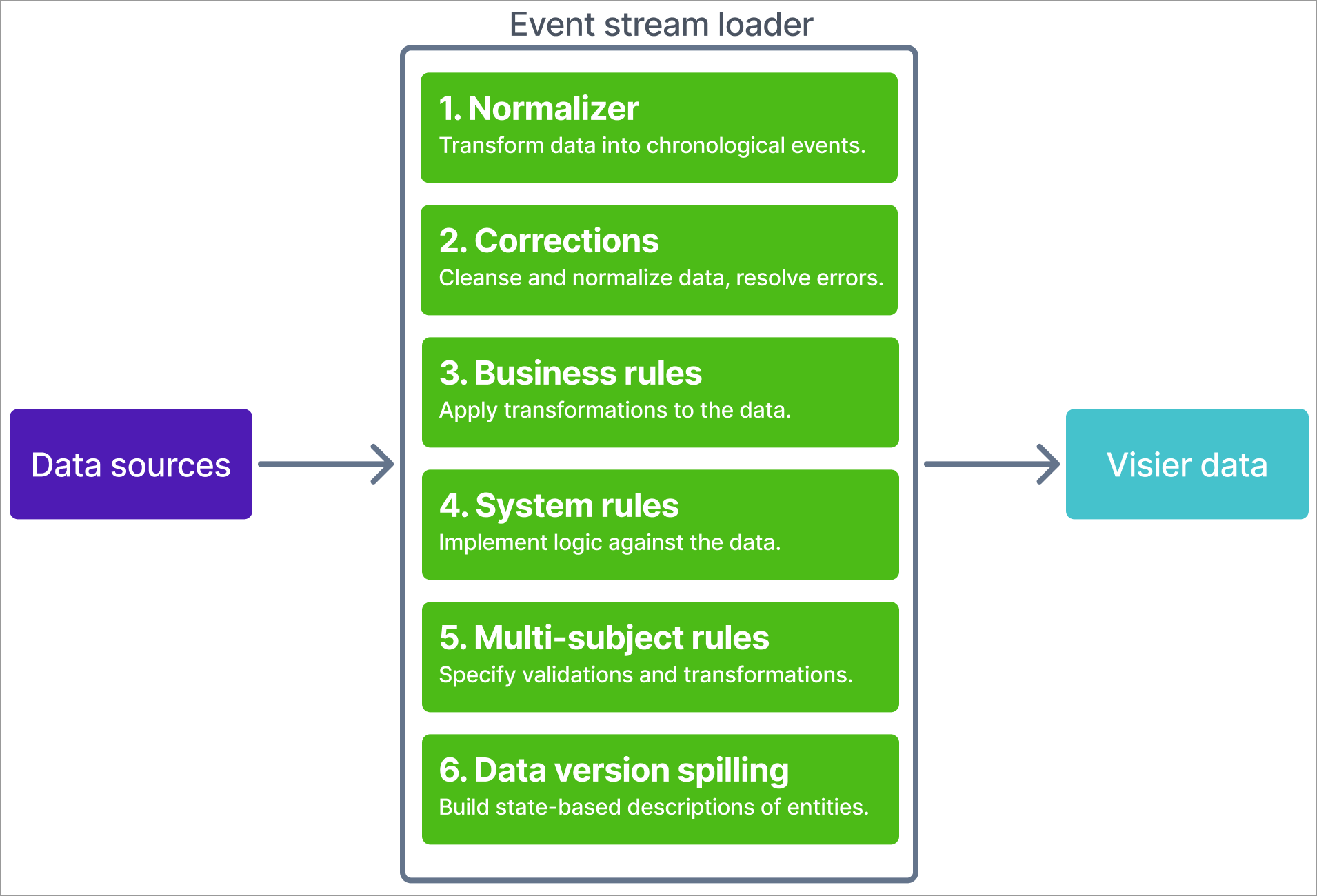
Stage 1: Normalizer
Extracts data from sources using mappings, then creates an event stream for each subject member. The normalizer stage performs the following actions:
- Extract and transform: Applies a series of Visier Extraction Language (VEL) rules to extract source data and transform the raw data into an event stream format. A rule is a single expression describing how to calculate a value for an attribute from a row. Optionally, extracts data using the row filter DSL, a subset of VEL.
- Override old data: Applies a loading behavior to resolve conflicts when the job finds multiple, inconsistent values for an attribute such as a restated value. This ensures that Visier displays the correct, intended values. For more information, see Override behavior.
After extracting events from the loaded data, the normalizer stage sorts data by subject member and then by time. Non-event mappings use the event date to sort record IDs. Next, the normalizer stage processes ordered data into event streams. The stage compares adjacent records to detect change. It then stores these changes as profile change events. For a brand new subject member, the first entry is a conception event.
Tip: This stage evaluates each target group's records independently from other target groups. If IDs move between target groups, expected changes could be missing because the stage evaluates the adjacent record only within the same target group.
Stage 2: Corrections
Optionally corrects errors in the event stream after it is built. If your solution doesn't contain correction mappings, nothing happens during this stage.
Visier applies corrections when the source data itself cannot be corrected and providing a full restatement is not possible. To apply corrections, you must provide a correction file for the specific properties to correct. These corrections are applied through rules after the stream is built and cannot change the profile conception or termination events. For more information about how to correct data, see Data Load Deletions and Corrections.
Stage 3: Business rules
The event stream loader applies business rules to the data, as defined next.
- Business rule: Apply transformations to the data, such as adding, removing, or editing events in the event stream. For more information, see Business Rules.
The event stream loader applies each business rule sequentially in this stage. After each rule, the loader performs an ambiguity check and resolves any new ambiguities.
Business rules:
- Run forward through time, not backward.
- Operate on one ID at a time.
- Evaluate all triggers and store the planned changes for each ID. A rule applies these changes only after evaluating the full history of the ID. As a result, a rule can't see the changes it plans to make.
- Process all change events on a timestamp before evaluating conditions.
Stage 4: System rules
The event stream loader applies system rules to the data, as defined next.
- System rule: Define how to handle subject data, such as adjacent terminations or incorrect parent-child hierarchies. For more information, see System Rules.
System rules are automatic rules with limited configurability. If you encounter unexpected behavior, it's most often related to two system rules, the CT system rule and the regular events rule.
- CT system rule: Aligns profiles with conception and termination events. It uses valid ranges to identify when changes occurred, then moves them to match the corresponding conception or termination event. It evaluates non-auxiliary profile conceptions and profile terminations against conception and termination events. If the data isn't consistent, it creates system events to reconcile it.
- Regular events rule: Extends non-active profiles to cover regular events that occur outside a valid profile, such as pay events after an exit.
Stage 5: Multi-subject rules
The event stream loader applies multi-subject rules to the data, as defined next.
- Multi-subject rule: Specify validations and transformations against more than one subject, such as adjusting the validity of data with validity ranges. Multi-subject rules run after business and system rules, so the data has already been transformed or logically configured. For more information, see Multi-Subject Rules.
The final result of this stage should match the values seen in your solution. Multi-subject rules usually rely on a common key or reference between two objects to produce the expected results.
Caution: Because multi-subject rules run after system rules, rules like the resolve validity rule can accidentally reactivate profiles when they shouldn't.
Stage 6: Data version spilling
After applying rules, the event stream does one of:
- For profile tables: The loader generates profiles from the event streams. A profile includes an instant in time and the complete state of the corresponding subject member at that instant. In this stage, the loader converts the event-based, transactional description of the data into a state-based description.
- For event tables: The loader spills data as-is.
In general, the final state of the multi-subject rules stage matches the data seen in Visier. However, actions in Stage 6 can affect how data appears, such as determining each object's end date. The end date causes different time slider behavior. As a result, some changes may not be visible in the Explore room because the subject ends before those changes happen.
The final data format is compatible with Visier's analytic solution. The next step to make data available for users is to link data to the analytic model. For more information, see Mappings.
Domain-specific languages
Visier uses several proprietary domain-specific languages to enable flexible, descriptive data extraction and transformation at key stages of the process.
Extraction language
Used in stage 1 to create profile properties from the source data. Each extraction formula is a single expression that describes a value for an attribute.
The language has:
- Literals, arithmetic expressions, and functions.
- Functions that obtain values from the source data (e.g., columns).
- Functions that perform transformations.
- Conditional structures like
if/elseandorElsefor handling missing values.
For more information, see Visier Extraction Language (VEL).
Row filters
Used in stage 1 to determine whether a row of source data should be included. Shares syntax with the Visier Extraction Language (VEL) but is restricted to a Boolean output of true or false.
Business rules language
Used in stage 3 to define actions that trigger based on conditions and are often used to detect and transform values. The following table describes the components of a formula written in VBRL.
|
Component |
Description |
Example |
|---|---|---|
|
Trigger (optional) |
A Boolean condition specifying when to apply the action. If omitted, the action always triggers. |
|
|
Action |
Defines the change to be made to the event stream: |
|
|
Conditional action |
Allows complex logic within the action. |
|
For more information, see Visier Business Rule Language (VBRL).
Multi-subject rules language
Used in stage 4 to apply logic to subject properties. Arguments include fully qualified attribute names (e.g., Employee.First_Name or Employee.Location.City).
Multi-subject rules use the following format.
call RULENAME (
ARG1,
ARG2,
…
)- call: Instructs Visier to call the rule.
- RULENAME: Specifies the rule to use. Each rule executes different logic against the arguments in the formula. For more information about the available rules, see Rules.
- ARG1, ARG2: Specifies the objects, such as subjects or properties, to validate. For more information about possible arguments, see Arguments.
For more information, see Visier Multi-Subject Rules Language.